

What is custom currency?
Custom currency is pricing in your own unit (such as credits) instead of a standard money currency like USD or EUR. You set and show prices in that unit-for example, “10 credits per month”-and Flexprice converts those amounts to your base currency (e.g. USD) for billing, This ensures a consistent currency for accounting, even though the feature is shown in credits.How it works internally
All billing calculations are performed using the pricing unit’s base currency (for example, USD). Amounts are defined and displayed in the pricing unit (e.g. credits), Conversion happens only at price or wallet creation; Flexprice uses the base currency for all calculations. In other words: input and display use the pricing unit; computation, persistence, and invoicing use base currency. Conversion uses the formula amount in your unit × conversion_rate = amount in base currency. Rounding and precision (e.g. two decimals for USD, zero for JPY) are applied only when invoice charges are computed, not at conversion or when creating prices or price units. Wallet balance is always shown in base currency and credits, whether the wallet was created with fiat or a custom price unit. Flexprice stores and bills everything in the base currency (e.g. USD).Using custom currency
- Create a Price Unit (dashboard or API, below).
- Use in plans — add charges or create prices in your unit; see Use cases.
- Use in wallets — create a wallet in your unit; see Use cases.
Use cases
- Credits or tokens - Sell in credits or tokens; show balance and charges in that unit while billing and storing in base currency (e.g. USD).
- Multi-currency display, single-currency billing - Present prices in a custom unit per region or product while retaining one base currency for accounting and payouts.
Concepts and terminology
Custom currency / Price Unit - Your own pricing unit (e.g. credits) used instead of fiat currency. Defined once as a Price Unit and reused across plans, prices, and wallets, with automatic conversion to the base currency for billing.
Conversion formula
conversion_rate = "0.01". Then 100 credits = 1.00 USD.
Price unit types: FIAT vs CUSTOM
- FIAT - Amounts are in a standard currency (USD, EUR, etc.). No conversion is applied.
- CUSTOM - Amounts are in a Price Unit. Flexprice converts to base currency for billing; you configure and display values in the custom unit.
Create a Price Unit (dashboard)
1
Open Price Units
Go to Product Catalog → Price Units → Add (or Create Price Unit).
2
Fill in the details
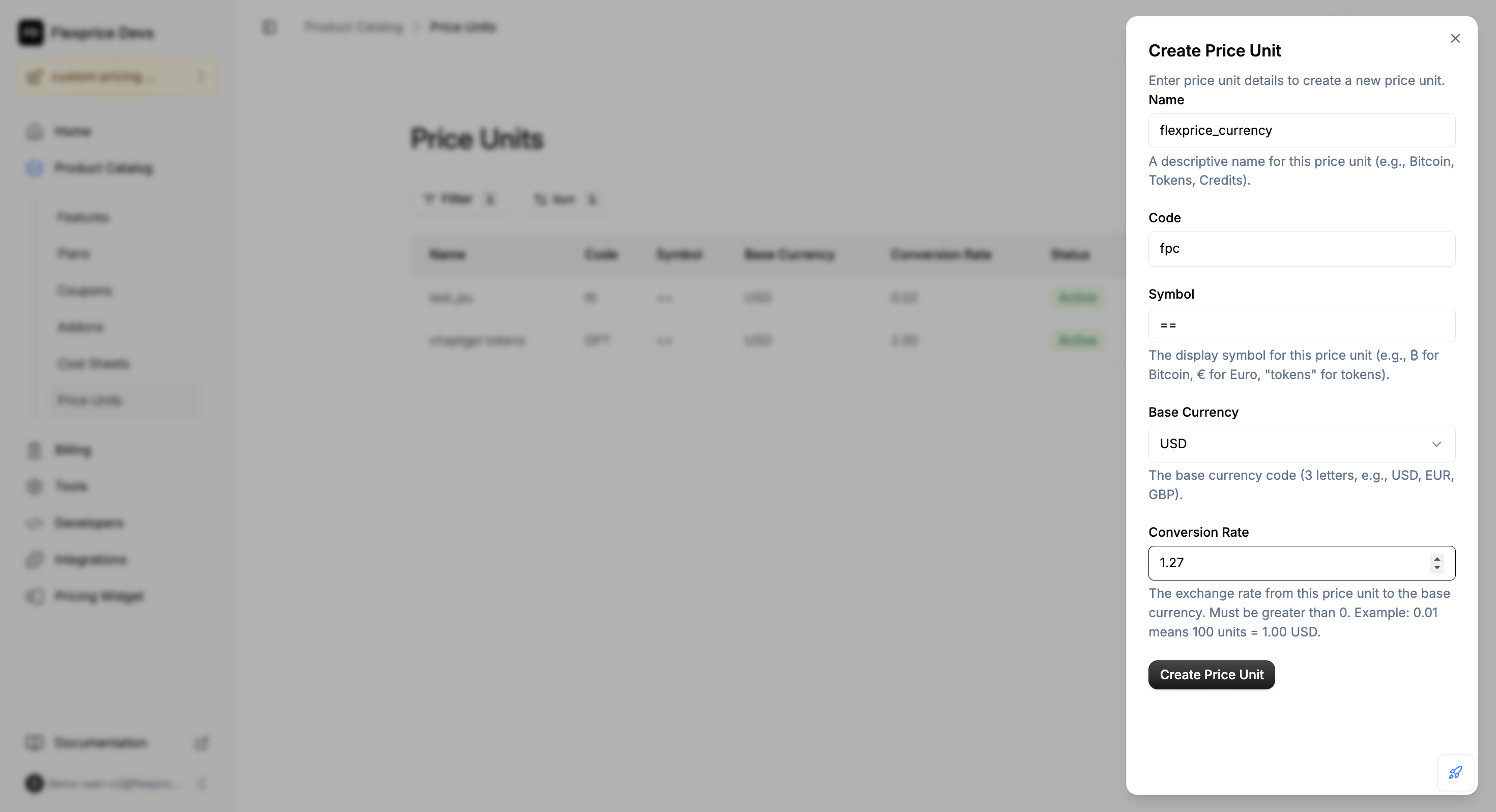
Enter Name, Code, Symbol, Base currency, and Conversion rate.
Example: 100 units = 1 USD → use conversion rate 0.01.
Example: 100 units = 1 USD → use conversion rate 0.01.
Create a Price Unit (API)
1
Call the create endpoint
Send
POST /v1/prices/units with a JSON body (you can see example below).2
Send the required fields
Include name, code, symbol, base_currency, and conversion_rate. Optionally metadata.
https://us.api.flexprice.io/v1 or https://api.cloud.flexprice.io/v1 (check out the Create a price unit).
Use custom currency in plans and prices
You can add charges or create prices in your custom unit from the dashboard or via the API. In both cases you choose your Price Unit and enter amounts in that unit; Flexprice converts to base currency for billing.Dashboard
1
Open the plan
Go to Product Catalog → Plans → open the plan you want to edit.
2
Add charges in custom currency
In Charges, click + Add (or Edit then add). In the Currency dropdown choose Custom and select your Price Unit. Add recurring or usage-based charges and enter amounts in your unit (e.g. 15 credits/month). Click Save.
API
1
Set the price to use your unit
In the create-price request (
POST /v1/prices), set price_unit_type to CUSTOM and include price_unit_config.2
Set price_unit and amount or tiers
In price_unit_config set price_unit (your unit’s code, e.g.
CRD). For a fixed amount use amount; for tiered pricing use price_unit_tiers only (not the top-level tiers field).FIXED), billing_cadence (e.g. RECURRING), and invoice_cadence (e.g. ADVANCE or ARREAR). Below shows the custom-pricing–relevant fields:
conversion_rate = "0.01", 100 CRD = 1.00 USD. Flexprice stores both the custom amount and the base-currency amount and uses base currency for billing.
Billing models
Refer to the API Reference and Price Unit documentation. check out the API Reference and the Price Unit.