

- Peak / off-peak pricing — Higher commitment and rate during business hours, lower outside.
- Reserved windows — Reserved capacity at a guaranteed rate inside a fixed window, standard pricing elsewhere.
- Tiered SLAs — Different minimum spends for production hours versus maintenance windows.
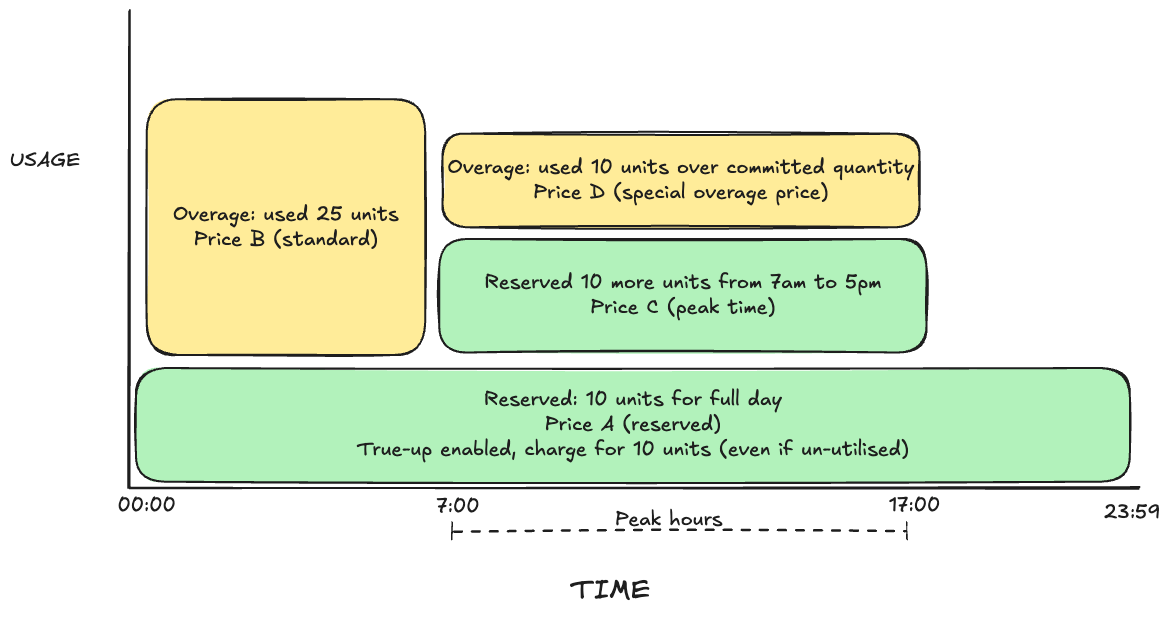
How Buckets Override the Line Item
A subscription line item carries a base price and an optional base commitment that apply across the entire billing period. A bucket attaches to that line item and overrides three things — but only for usage whose timestamp falls inside the bucket’s[start, end) range:
You can attach as many buckets as you need to one line item. Buckets are stored in the order they are provided and matched at billing time by checking each window’s start timestamp against bucket ranges.
All bucket times are interpreted in UTC. Convert your local peak hours to UTC before configuring buckets.
Example scenario
A line item meters API calls with:- Base price: $1.00 per call
- Base commitment: 10 reserved units per window, true-up enabled (Price A)
The line item’s reserved 10 units (Price A) and true-up apply across the full day. The bucket layers an additional 10 reserved units at Price C only during 07:00–17:00, with its own overage at Price D for usage exceeding the bucket commitment.
Constraints
1. The meter must be bucketed
A bucket can only be attached to a line item whose meter has an aggregation window — a “bucketed” meter that applies commitment per window rather than once per billing cycle. The line item must havecommitment_windowed: true.
2. Bucket duration must be at least one meter window
If the meter aggregates per hour, a bucket cannot be shorter than 1 hour. A bucket that spans less than one full meter window cannot accumulate a complete usage measurement.3. Bucket duration must be an exact multiple of the meter window
end - start must be divisible by the meter’s window size. If the meter window is HOUR, the bucket 12:00 → 13:30 is rejected: the 90-minute duration leaves 30 minutes of a second meter window unaccounted for.
The bucket
start must also align to the meter window grid — for an hourly meter, the start minute-of-day must be divisible by 60.
4. Buckets cannot overlap
Two buckets on the same line item cannot share any minute of the day. Adjacent buckets are allowed because ranges are half-open[start, end):
[09:00, 12:00)and[12:00, 17:00)→ valid (adjacent, no shared minute).[09:00, 12:00)and[11:00, 14:00)→ invalid (overlap on 11:00–12:00).
5. Outside a bucket, the line-item commitment continues to apply
Buckets are an override, not a replacement. Any usage window whose start timestamp falls outside every configured bucket is billed at the line item’s base price and base commitment, with the line item’s overage factor and true-up flag. If the line item has no base commitment, out-of-bucket usage is billed at the base rate only.Midnight-wrapping ranges
A bucket can wrap midnight.{ "start": { "hour": 22, "minute": 0 }, "end": { "hour": 6, "minute": 0 } } covers 22:00–23:59 and 00:00–05:59 in UTC. The 24:00 end value is allowed only with minute: 0 and represents end-of-day.
Bucket Fields
Example: Peak and Off-Peak Commitment
The line item meters API calls with an hourly window. Peak hours 09:00–17:00 UTC carry a higher reserved commitment and rate; off-peak hours carry a lower commitment, a discounted price, and true-up.[17:00, 09:00) covers 17:00–23:59 and 00:00–08:59 UTC. Together the two buckets tile the full day, so every usage window matches exactly one bucket and the line-item base commitment is never consulted.
Billing walk-through
With an hourly meter and the configuration above, consider three windows in a single day:
The billing engine picks the bucket whose
[start, end) range contains the window start timestamp, then runs the standard commitment/overage/true-up calculation against that bucket’s values.
Updating Buckets
OnPATCH of a subscription line item, the commitment_time_buckets array replaces the existing array:
- Keep an existing bucket — include its
idand omitprice. Commitment fields are read from the request, so you can changecommitment_value,overage_factor, ortrue_up_enabledwhile keeping the original price. - Add a new bucket — omit
idand include an inlineprice. The server creates a subscription-scoped price and assigns a bucket ID. - Remove all buckets — send
"commitment_time_buckets": []. Omitting the field entirely keeps the existing buckets unchanged.