> ## Documentation Index
> Fetch the complete documentation index at: https://docs.flexprice.io/llms.txt
> Use this file to discover all available pages before exploring further.
# Seat-Based Pricing
> Bill customers per user, seat, or license. Set quantity at subscription creation and adjust it at any time with optional future-dating.
Seat-based pricing lets you charge customers based on the number of seats (users, licenses, or any countable unit) they provision. Set the initial seat count when creating a subscription, then increase or decrease it at any time - immediately or on a future date - using the modification API.
## When to Use
* SaaS products that charge per user (e.g. \$20/user/month)
* License-based billing (editor seats, API keys, agent instances)
* Hybrid plans: a fixed base fee plus per-seat charges
* Enterprise contracts with minimum seat commitments
If charges are driven by events (API calls, compute time, etc.), use [Event Ingestion](/docs/event-ingestion/overview) instead. Seat-based billing is for known, provisioned quantities, not metered consumption.
## How It Works
Seat-based billing has three stages:
1. **Configure a per-seat price** on a plan - a fixed price with `billing_model: FLAT_FEE` and a per-unit `amount`.
2. **Create a subscription** and set the initial seat count via `line_items[].quantity` (or `override_line_items[].quantity` for a customer-specific count).
3. **Adjust seat count** mid-subscription using the modification API with an optional `effective_date`.
The billing engine multiplies `amount x quantity` when generating invoice line items each billing period.
## Step 1: Configure a Per-Seat Price on Your Plan
A per-seat price is a fixed price with `FLAT_FEE` billing model. The `amount` is the cost per seat per billing period.
```json theme={null}
POST /prices
{
"entity_type": "plan",
"entity_id": "plan_01JVKM3P9YQRS5GHTU0MCXA4T",
"type": "FIXED",
"currency": "usd",
"amount": "20.00",
"billing_model": "FLAT_FEE",
"billing_period": "MONTHLY",
"billing_period_count": 1,
"invoice_cadence": "ADVANCE",
"description": "Per seat, billed monthly",
"lookup_key": "seat_monthly"
}
```
| Field | Value | Notes |
| ---------------------- | ----------------------------- | ------------------------------------------------------------------------ |
| `entity_type` | `"plan"` | Attaches this price to a plan |
| `entity_id` | plan ID | The plan this price belongs to |
| `type` | `"FIXED"` | Fixed charge (not metered). Use `"USAGE"` for metered prices |
| `amount` | `"20.00"` | Cost per seat per billing period |
| `billing_model` | `"FLAT_FEE"` | Multiplies amount x quantity |
| `billing_period` | `"MONTHLY"` / `"ANNUAL"` etc. | How often the seat charge recurs |
| `billing_period_count` | `1` | Number of periods per cycle. `1` with `MONTHLY` means charge every month |
| `invoice_cadence` | `"ADVANCE"` | Bill at the start of each period (typical for seats) |
**Package pricing for seat buckets:** If you charge per block of seats (e.g. \$100 per 5 seats), use `billing_model: PACKAGE` and set `transform_quantity.divide_by: 5`. The billing engine divides the raw quantity by 5 before applying the price.
## Step 2: Create a Subscription with an Initial Seat Count
Set the seat count in `line_items` when creating the subscription. Reference the price by its `price_id` and pass the initial quantity.
```json theme={null}
POST /subscriptions
{
"customer_id": "cust_01JVKM2N8XPQR4FGHT9LBWZ3S",
"plan_id": "plan_01JVKM3P9YQRS5GHTU0MCXA4T",
"currency": "usd",
"billing_cadence": "RECURRING",
"billing_period": "MONTHLY",
"billing_cycle": "anniversary",
"line_items": [
{
"price_id": "price_01JVKM4Q0ZRST6HITUV1NDYB5",
"quantity": "25"
}
]
}
```
The response includes the created subscription with `line_items[].id`. Save this ID - you will need it in Step 3 to modify seat count.
```json theme={null}
{
"id": "subs_01JVKM6S2BTUV8JKVWX3PFAD7",
"status": "ACTIVE",
"customer_id": "cust_01JVKM2N8XPQR4FGHT9LBWZ3S",
"plan_id": "plan_01JVKM3P9YQRS5GHTU0MCXA4T",
"line_items": [
{
"id": "subs_line_01JVKM5R1ASTU7IJUVW2OEZC6",
"price_id": "price_01JVKM4Q0ZRST6HITUV1NDYB5",
"quantity": "25",
"price_type": "FIXED",
"start_date": "2026-06-01T00:00:00Z",
"end_date": null
}
]
}
```
This creates a subscription where 25 seats x $20 = **$500/month\*\* is charged at the start of each period.
### Customer-Specific Seat Count (Override)
For enterprise customers with a negotiated seat count, use `override_line_items` instead. The plan stays unchanged - only this subscription uses the overridden quantity.
```json theme={null}
POST /subscriptions
{
"customer_id": "cust_01JVKN3P0ZRST7IJUVW3OEZD7",
"plan_id": "plan_01JVKM3P9YQRS5GHTU0MCXA4T",
"currency": "usd",
"billing_cadence": "RECURRING",
"billing_period": "ANNUAL",
"billing_cycle": "anniversary",
"override_line_items": [
{
"price_id": "price_01JVKM4Q0ZRST6HITUV1NDYB5",
"quantity": "500"
}
]
}
```
`quantity` cannot be set on usage-based (metered) prices. It is only valid on fixed prices with `FLAT_FEE`, `PACKAGE`, or `TIERED` billing models.
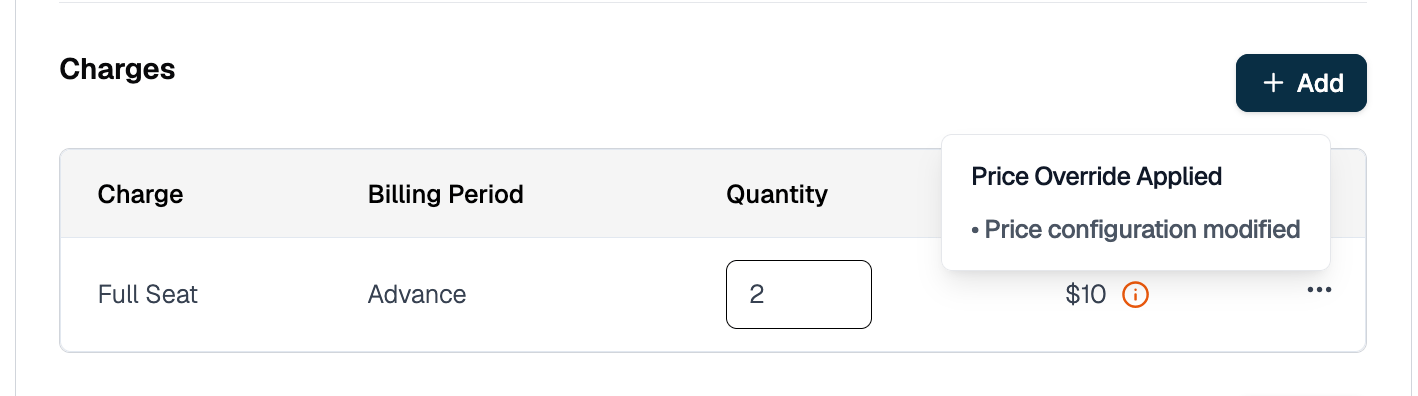 ## Step 3: Adjust Seat Count on a Live Subscription
Use the subscription modification API to change the seat count after the subscription is active. You can apply the change immediately or schedule it for a future date.
### 3a. Find the Line Item ID
The modification API takes a line item ID (`li_...`), not a price ID. The `line_items[].id` is returned when you create the subscription (see Step 2) or when you fetch it:
```
GET /subscriptions/subs_01JVKM6S2BTUV8JKVWX3PFAD7
```
Match the line item to the right price via `line_items[].price_id`.
### 3b. Preview the Change (Recommended)
Before executing, preview the billing impact:
```json theme={null}
POST /subscriptions/subs_01JVKM6S2BTUV8JKVWX3PFAD7/modify/preview
{
"type": "quantity_change",
"quantity_change_params": {
"line_items": [
{
"id": "subs_line_01JVKM5R1ASTU7IJUVW2OEZC6",
"quantity": "40"
}
]
}
}
```
## Step 3: Adjust Seat Count on a Live Subscription
Use the subscription modification API to change the seat count after the subscription is active. You can apply the change immediately or schedule it for a future date.
### 3a. Find the Line Item ID
The modification API takes a line item ID (`li_...`), not a price ID. The `line_items[].id` is returned when you create the subscription (see Step 2) or when you fetch it:
```
GET /subscriptions/subs_01JVKM6S2BTUV8JKVWX3PFAD7
```
Match the line item to the right price via `line_items[].price_id`.
### 3b. Preview the Change (Recommended)
Before executing, preview the billing impact:
```json theme={null}
POST /subscriptions/subs_01JVKM6S2BTUV8JKVWX3PFAD7/modify/preview
{
"type": "quantity_change",
"quantity_change_params": {
"line_items": [
{
"id": "subs_line_01JVKM5R1ASTU7IJUVW2OEZC6",
"quantity": "40"
}
]
}
}
```
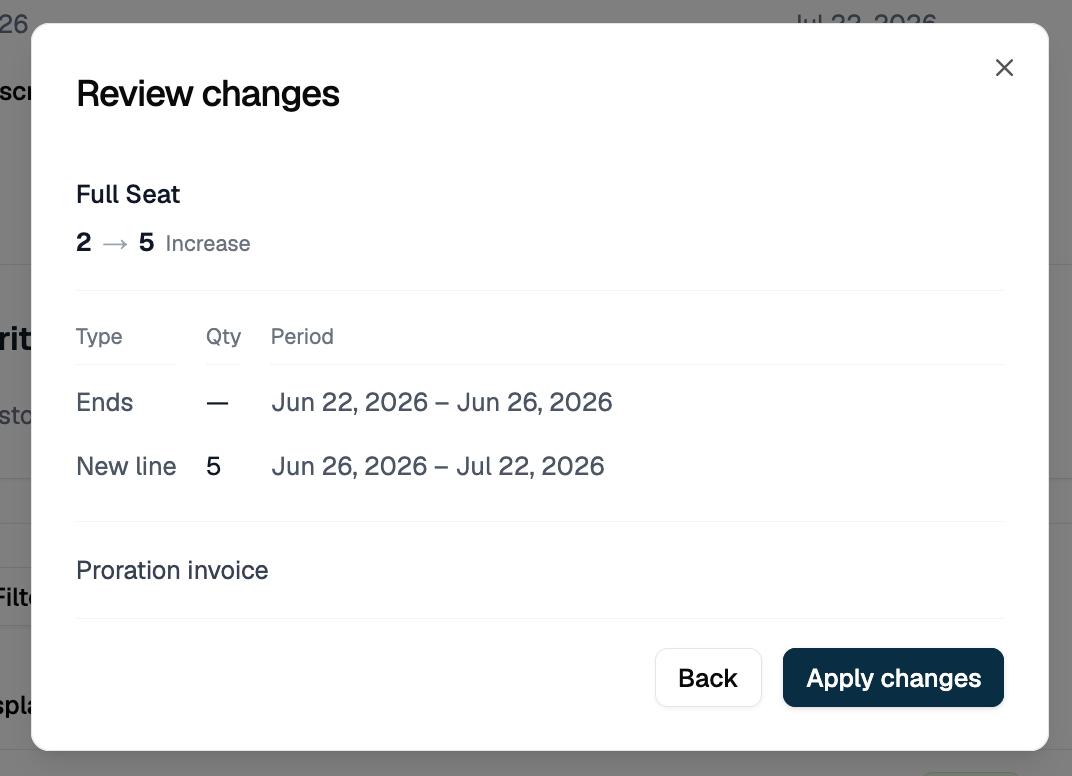 The UI preview shows the old and new line item periods and confirms a proration invoice will be generated. The API returns the same information in `changed_resources`:
```json theme={null}
{
"subscription": { "id": "subs_01JVKM6S2BTUV8JKVWX3PFAD7", "..." : "..." },
"changed_resources": {
"line_items": [
{
"id": "(preview-ended)",
"price_id": "price_01JVKM4Q0ZRST6HITUV1NDYB5",
"quantity": "25",
"start_date": "2026-06-01T00:00:00Z",
"end_date": "2026-06-10T14:32:00Z",
"change_action": "ended"
},
{
"id": "(preview-created)",
"price_id": "price_01JVKM4Q0ZRST6HITUV1NDYB5",
"quantity": "40",
"start_date": "2026-06-10T14:32:00Z",
"end_date": "2026-07-01T00:00:00Z",
"change_action": "created"
}
],
"invoices": [
{
"id": "(preview-invoice)",
"action": "created",
"status": "preview",
"invoice": {
"invoice_status": "DRAFT",
"invoice_type": "ONE_OFF",
"billing_reason": "SUBSCRIPTION_UPDATE",
"amount_due": "203.23",
"currency": "usd"
}
}
]
}
}
```
Nothing is billed until you call the execute endpoint. The `status: "preview"` on the invoice confirms this is a dry run. Preview never writes anything, so the IDs are the placeholders `(preview-ended)`, `(preview-created)`, and `(preview-invoice)` rather than real IDs.
### 3c. Execute an Immediate Seat Change
Omit `effective_date` to apply the change right now:
```json theme={null}
POST /subscriptions/subs_01JVKM6S2BTUV8JKVWX3PFAD7/modify/execute
{
"type": "quantity_change",
"quantity_change_params": {
"line_items": [
{
"id": "subs_line_01JVKM5R1ASTU7IJUVW2OEZC6",
"quantity": "40"
}
]
}
}
```
The current line item is terminated immediately and a new one starts with `quantity: 40`. The response has the same shape as the preview, but with real IDs and the invoice's payment status in place of `preview`:
```json theme={null}
{
"subscription": { "id": "subs_01JVKM6S2BTUV8JKVWX3PFAD7", "..." : "..." },
"changed_resources": {
"line_items": [
{
"id": "subs_line_01JVKM5R1ASTU7IJUVW2OEZC6",
"price_id": "price_01JVKM4Q0ZRST6HITUV1NDYB5",
"quantity": "25",
"start_date": "2026-06-01T00:00:00Z",
"end_date": "2026-06-10T14:32:00Z",
"change_action": "ended"
},
{
"id": "subs_line_01JVKN7T3CUVW9KLVWX4QGBE8",
"price_id": "price_01JVKM4Q0ZRST6HITUV1NDYB5",
"quantity": "40",
"start_date": "2026-06-10T14:32:00Z",
"end_date": null,
"change_action": "created"
}
],
"invoices": [
{
"id": "inv_01JVKN8U4DVWX0LMWXY5RHCF9",
"action": "created",
"status": "PENDING",
"invoice": {
"invoice_status": "FINALIZED",
"amount_due": "203.23",
"currency": "usd"
}
}
]
}
}
```
### 3d. Schedule a Future-Dated Seat Change
Pass an `effective_date` to defer the change:
```json theme={null}
POST /subscriptions/subs_01JVKM6S2BTUV8JKVWX3PFAD7/modify/execute
{
"type": "quantity_change",
"quantity_change_params": {
"line_items": [
{
"id": "subs_line_01JVKM5R1ASTU7IJUVW2OEZC6",
"quantity": "40",
"effective_date": "2026-07-01T00:00:00Z"
}
]
}
}
```
What happens internally:
1. The current line item's `end_date` is set to `2026-07-01T00:00:00Z`
2. A new line item is created with `start_date: 2026-07-01T00:00:00Z` and `quantity: 40`
3. Billing continues at the old quantity until July 1, then switches to 40 seats
Use this when a customer confirms they'll add seats at the start of next month and you don't want a mid-period invoice now.
The UI preview shows the old and new line item periods and confirms a proration invoice will be generated. The API returns the same information in `changed_resources`:
```json theme={null}
{
"subscription": { "id": "subs_01JVKM6S2BTUV8JKVWX3PFAD7", "..." : "..." },
"changed_resources": {
"line_items": [
{
"id": "(preview-ended)",
"price_id": "price_01JVKM4Q0ZRST6HITUV1NDYB5",
"quantity": "25",
"start_date": "2026-06-01T00:00:00Z",
"end_date": "2026-06-10T14:32:00Z",
"change_action": "ended"
},
{
"id": "(preview-created)",
"price_id": "price_01JVKM4Q0ZRST6HITUV1NDYB5",
"quantity": "40",
"start_date": "2026-06-10T14:32:00Z",
"end_date": "2026-07-01T00:00:00Z",
"change_action": "created"
}
],
"invoices": [
{
"id": "(preview-invoice)",
"action": "created",
"status": "preview",
"invoice": {
"invoice_status": "DRAFT",
"invoice_type": "ONE_OFF",
"billing_reason": "SUBSCRIPTION_UPDATE",
"amount_due": "203.23",
"currency": "usd"
}
}
]
}
}
```
Nothing is billed until you call the execute endpoint. The `status: "preview"` on the invoice confirms this is a dry run. Preview never writes anything, so the IDs are the placeholders `(preview-ended)`, `(preview-created)`, and `(preview-invoice)` rather than real IDs.
### 3c. Execute an Immediate Seat Change
Omit `effective_date` to apply the change right now:
```json theme={null}
POST /subscriptions/subs_01JVKM6S2BTUV8JKVWX3PFAD7/modify/execute
{
"type": "quantity_change",
"quantity_change_params": {
"line_items": [
{
"id": "subs_line_01JVKM5R1ASTU7IJUVW2OEZC6",
"quantity": "40"
}
]
}
}
```
The current line item is terminated immediately and a new one starts with `quantity: 40`. The response has the same shape as the preview, but with real IDs and the invoice's payment status in place of `preview`:
```json theme={null}
{
"subscription": { "id": "subs_01JVKM6S2BTUV8JKVWX3PFAD7", "..." : "..." },
"changed_resources": {
"line_items": [
{
"id": "subs_line_01JVKM5R1ASTU7IJUVW2OEZC6",
"price_id": "price_01JVKM4Q0ZRST6HITUV1NDYB5",
"quantity": "25",
"start_date": "2026-06-01T00:00:00Z",
"end_date": "2026-06-10T14:32:00Z",
"change_action": "ended"
},
{
"id": "subs_line_01JVKN7T3CUVW9KLVWX4QGBE8",
"price_id": "price_01JVKM4Q0ZRST6HITUV1NDYB5",
"quantity": "40",
"start_date": "2026-06-10T14:32:00Z",
"end_date": null,
"change_action": "created"
}
],
"invoices": [
{
"id": "inv_01JVKN8U4DVWX0LMWXY5RHCF9",
"action": "created",
"status": "PENDING",
"invoice": {
"invoice_status": "FINALIZED",
"amount_due": "203.23",
"currency": "usd"
}
}
]
}
}
```
### 3d. Schedule a Future-Dated Seat Change
Pass an `effective_date` to defer the change:
```json theme={null}
POST /subscriptions/subs_01JVKM6S2BTUV8JKVWX3PFAD7/modify/execute
{
"type": "quantity_change",
"quantity_change_params": {
"line_items": [
{
"id": "subs_line_01JVKM5R1ASTU7IJUVW2OEZC6",
"quantity": "40",
"effective_date": "2026-07-01T00:00:00Z"
}
]
}
}
```
What happens internally:
1. The current line item's `end_date` is set to `2026-07-01T00:00:00Z`
2. A new line item is created with `start_date: 2026-07-01T00:00:00Z` and `quantity: 40`
3. Billing continues at the old quantity until July 1, then switches to 40 seats
Use this when a customer confirms they'll add seats at the start of next month and you don't want a mid-period invoice now.
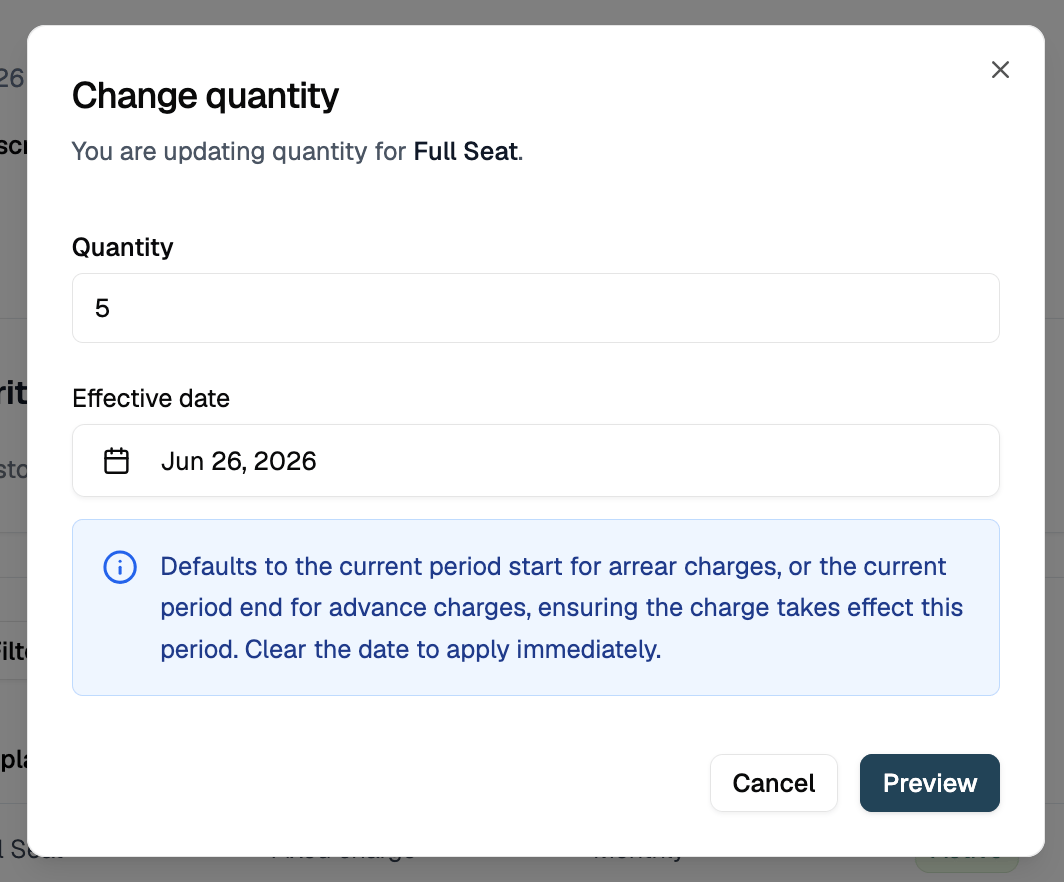 ### 3e. Collect Payment Before Seats Change
By default the seat change applies immediately and the proration charge is invoiced afterwards, which can leave an unpaid invoice. To require payment first, add a `checkout` object to the execute call:
```json theme={null}
POST /subscriptions/subs_01KXZW2XJJPJ5GP919AD31HY7K/modify/execute
{
"type": "quantity_change",
"quantity_change_params": {
"line_items": [
{
"id": "subs_line_01KXZW2XJP3S3D5NE7TE84YP0V",
"quantity": "5"
}
]
},
"checkout": {
"payment_provider": "razorpay",
"success_url": "https://app.example.com/seats/success",
"cancel_url": "https://app.example.com/seats/cancel"
}
}
```
Seats are left untouched. Flexprice creates a `DRAFT` proration invoice for the amount, opens a checkout session, and returns a payment link in `checkout_session.payment_action.url`:
```json theme={null}
{
"subscription": { "id": "subs_01KXZW2XJJPJ5GP919AD31HY7K", "..." : "..." },
"changed_resources": {
"line_items": [
{ "id": "(preview-ended)", "quantity": "1", "change_action": "ended" },
{ "id": "(preview-created)", "quantity": "5", "change_action": "created" }
],
"invoices": [
{
"id": "inv_01KY9HQG28KJ4PVVFH5A7M4P77",
"action": "created",
"status": "PENDING",
"invoice": {
"invoice_status": "DRAFT",
"amount_due": "56.89",
"currency": "usd"
}
}
]
},
"checkout_session": {
"id": "cs_01KY9HRZ25PPJ7W1THZNM43QW8",
"checkout_status": "pending",
"payment_action": {
"type": "payment_link",
"url": "https://rzp.io/l/XXXXXXX"
}
}
}
```
Redirect the customer to that URL. When the payment succeeds, Flexprice ends the old line item, creates the replacement, and finalizes the same invoice without recalculating the proration.
| Behavior | Detail |
| --------------- | ---------------------------------------------------------------------------------------------------------------------------------------------------------------------------------------------------- |
| Allowed types | `checkout` is only accepted with `type: "quantity_change"`. Any other type returns a validation error |
| When it engages | Only when the batch nets to a charge. If charges minus credits is zero or negative, the change applies immediately and `checkout` is ignored |
| Mixed batches | An upgrade and a downgrade in one request are netted into a single amount, not rejected |
| Line item IDs | The response carries the `(preview-ended)` and `(preview-created)` placeholders because the real replacement ID is only generated after payment. Refetch the subscription once the session completes |
The seat count does not change while the session is pending, and a second pay-first request for the same subscription is rejected until the open session is completed or cancelled. If the customer never pays, the draft invoice is archived and seats stay as they were.
For the session lifecycle, expiry, webhook events, and charging a saved payment method instead of sending a link, see [Pay-First Checkout](/docs/checkout/pay-first-checkout).
## Proration on Seat Changes
When you change seat count mid-period, Flexprice prorates based on days remaining in the current billing period.
### Upgrade (Adding Seats): Mid-Month Example
**Before change:** 25 seats x $20 = $500/month, billed on the 1st.
**Change on day 10:** Increase to 40 seats.
**Days remaining:** 21 of 31.
| Line item | Calculation | Amount |
| ------------------------------------- | --------------- | ------------ |
| Credit for unused days at 25 seats | (21/31) x \$500 | -\$338.71 |
| Charge for remaining days at 40 seats | (21/31) x \$800 | +\$541.94 |
| **Net invoice** | | **\$203.23** |
### Downgrade (Removing Seats): Mid-Month Example
**Before change:** 40 seats x $20 = $800/month, billed on the 1st.
**Change on day 10:** Decrease to 25 seats.
**Days remaining:** 21 of 31.
| Line item | Calculation | Amount |
| ------------------------------------- | --------------- | ------------- |
| Credit for unused days at 40 seats | (21/31) x \$800 | -\$541.94 |
| Charge for remaining days at 25 seats | (21/31) x \$500 | +\$338.71 |
| **Net** | | **-\$203.23** |
What gets issued depends on the price's `invoice_cadence`:
* **`ADVANCE`** (billed at period start): the customer was already charged for the full period, so a **refund** of \$203.23 is issued.
* **`ARREAR`** (billed at period end): nothing has been charged yet, so a **one-off invoice** for $338.71 (the remaining days at 25 seats) is generated immediately and the $541.94 credit offsets the end-of-period invoice.
### Skip Proration: Change at Period End
To avoid a mid-period invoice entirely, set `effective_date` to the start of the next billing period. The old seat count bills through the end of the current period and the new count takes effect at renewal.
## Seat-Based Billing in the UI
You can manage seat counts from the Subscription detail page in the Flexprice dashboard without touching the API.
**Viewing seat history:** The subscription timeline shows every quantity change with its effective date and the invoice it triggered.
### 3e. Collect Payment Before Seats Change
By default the seat change applies immediately and the proration charge is invoiced afterwards, which can leave an unpaid invoice. To require payment first, add a `checkout` object to the execute call:
```json theme={null}
POST /subscriptions/subs_01KXZW2XJJPJ5GP919AD31HY7K/modify/execute
{
"type": "quantity_change",
"quantity_change_params": {
"line_items": [
{
"id": "subs_line_01KXZW2XJP3S3D5NE7TE84YP0V",
"quantity": "5"
}
]
},
"checkout": {
"payment_provider": "razorpay",
"success_url": "https://app.example.com/seats/success",
"cancel_url": "https://app.example.com/seats/cancel"
}
}
```
Seats are left untouched. Flexprice creates a `DRAFT` proration invoice for the amount, opens a checkout session, and returns a payment link in `checkout_session.payment_action.url`:
```json theme={null}
{
"subscription": { "id": "subs_01KXZW2XJJPJ5GP919AD31HY7K", "..." : "..." },
"changed_resources": {
"line_items": [
{ "id": "(preview-ended)", "quantity": "1", "change_action": "ended" },
{ "id": "(preview-created)", "quantity": "5", "change_action": "created" }
],
"invoices": [
{
"id": "inv_01KY9HQG28KJ4PVVFH5A7M4P77",
"action": "created",
"status": "PENDING",
"invoice": {
"invoice_status": "DRAFT",
"amount_due": "56.89",
"currency": "usd"
}
}
]
},
"checkout_session": {
"id": "cs_01KY9HRZ25PPJ7W1THZNM43QW8",
"checkout_status": "pending",
"payment_action": {
"type": "payment_link",
"url": "https://rzp.io/l/XXXXXXX"
}
}
}
```
Redirect the customer to that URL. When the payment succeeds, Flexprice ends the old line item, creates the replacement, and finalizes the same invoice without recalculating the proration.
| Behavior | Detail |
| --------------- | ---------------------------------------------------------------------------------------------------------------------------------------------------------------------------------------------------- |
| Allowed types | `checkout` is only accepted with `type: "quantity_change"`. Any other type returns a validation error |
| When it engages | Only when the batch nets to a charge. If charges minus credits is zero or negative, the change applies immediately and `checkout` is ignored |
| Mixed batches | An upgrade and a downgrade in one request are netted into a single amount, not rejected |
| Line item IDs | The response carries the `(preview-ended)` and `(preview-created)` placeholders because the real replacement ID is only generated after payment. Refetch the subscription once the session completes |
The seat count does not change while the session is pending, and a second pay-first request for the same subscription is rejected until the open session is completed or cancelled. If the customer never pays, the draft invoice is archived and seats stay as they were.
For the session lifecycle, expiry, webhook events, and charging a saved payment method instead of sending a link, see [Pay-First Checkout](/docs/checkout/pay-first-checkout).
## Proration on Seat Changes
When you change seat count mid-period, Flexprice prorates based on days remaining in the current billing period.
### Upgrade (Adding Seats): Mid-Month Example
**Before change:** 25 seats x $20 = $500/month, billed on the 1st.
**Change on day 10:** Increase to 40 seats.
**Days remaining:** 21 of 31.
| Line item | Calculation | Amount |
| ------------------------------------- | --------------- | ------------ |
| Credit for unused days at 25 seats | (21/31) x \$500 | -\$338.71 |
| Charge for remaining days at 40 seats | (21/31) x \$800 | +\$541.94 |
| **Net invoice** | | **\$203.23** |
### Downgrade (Removing Seats): Mid-Month Example
**Before change:** 40 seats x $20 = $800/month, billed on the 1st.
**Change on day 10:** Decrease to 25 seats.
**Days remaining:** 21 of 31.
| Line item | Calculation | Amount |
| ------------------------------------- | --------------- | ------------- |
| Credit for unused days at 40 seats | (21/31) x \$800 | -\$541.94 |
| Charge for remaining days at 25 seats | (21/31) x \$500 | +\$338.71 |
| **Net** | | **-\$203.23** |
What gets issued depends on the price's `invoice_cadence`:
* **`ADVANCE`** (billed at period start): the customer was already charged for the full period, so a **refund** of \$203.23 is issued.
* **`ARREAR`** (billed at period end): nothing has been charged yet, so a **one-off invoice** for $338.71 (the remaining days at 25 seats) is generated immediately and the $541.94 credit offsets the end-of-period invoice.
### Skip Proration: Change at Period End
To avoid a mid-period invoice entirely, set `effective_date` to the start of the next billing period. The old seat count bills through the end of the current period and the new count takes effect at renewal.
## Seat-Based Billing in the UI
You can manage seat counts from the Subscription detail page in the Flexprice dashboard without touching the API.
**Viewing seat history:** The subscription timeline shows every quantity change with its effective date and the invoice it triggered.
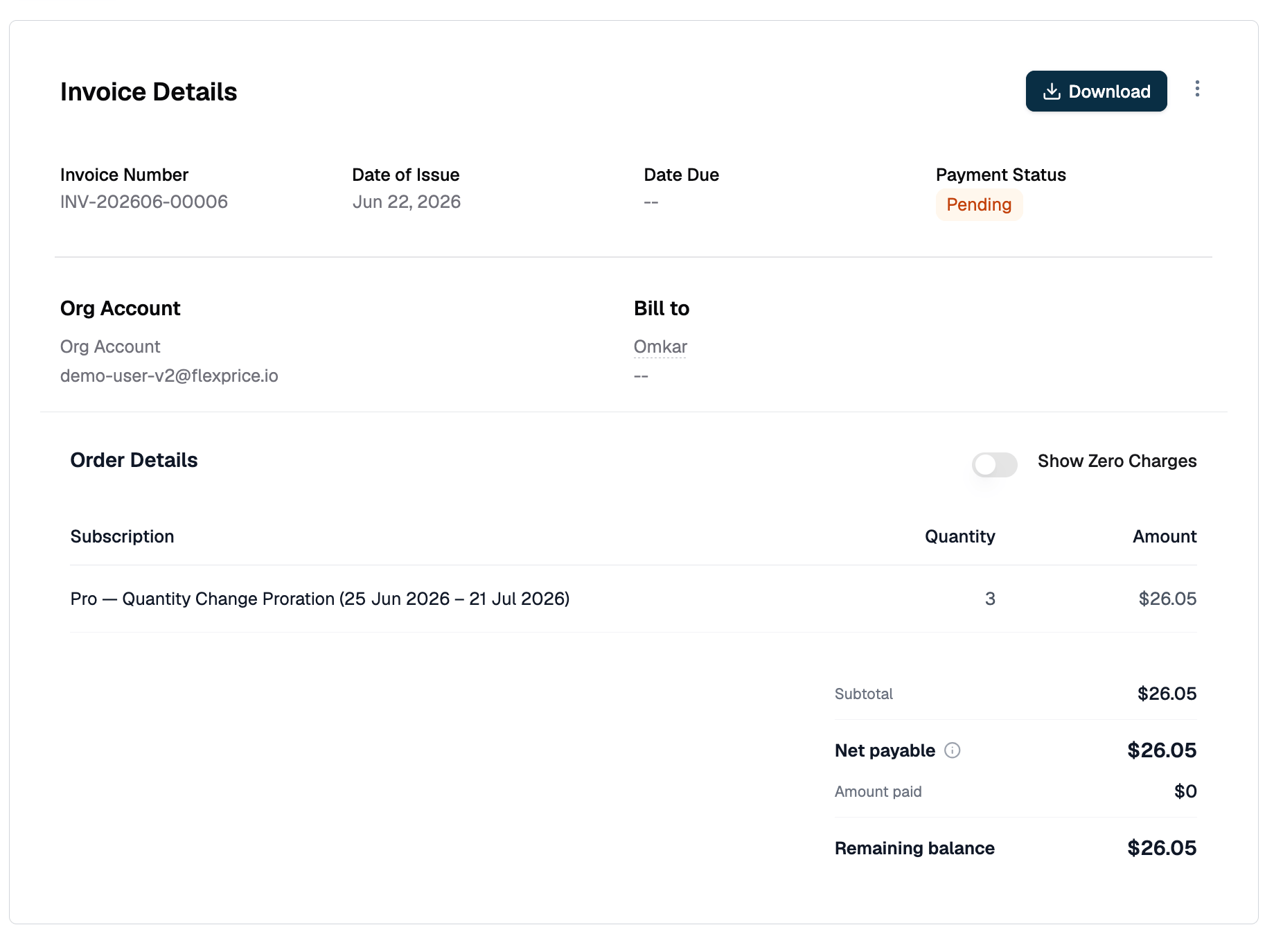
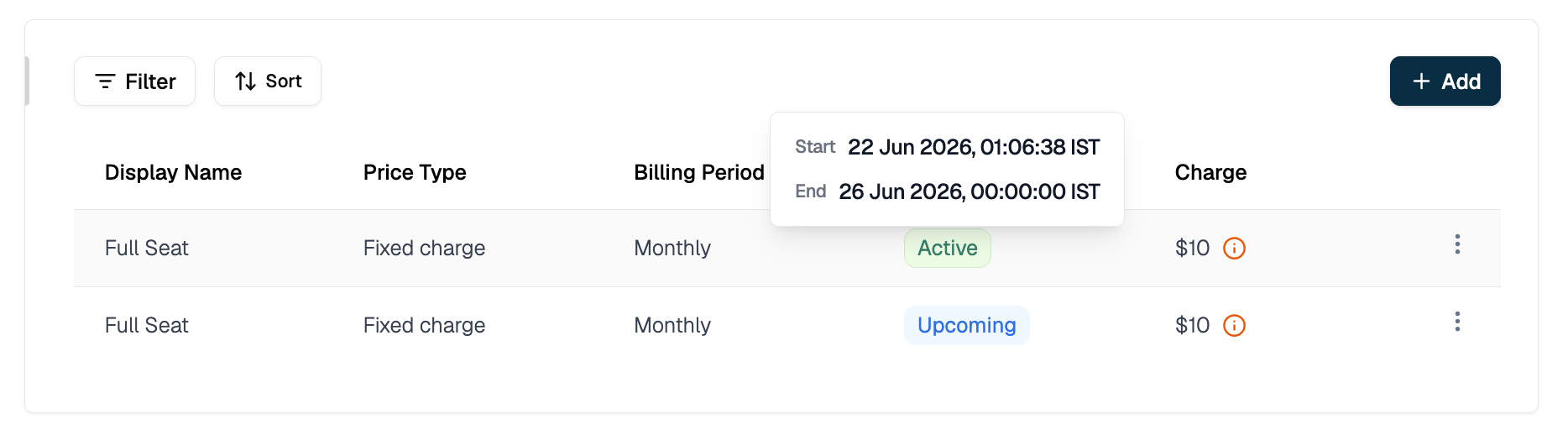 **Viewing the prorated invoice:** When a mid-period seat change generates an invoice, the invoice detail shows two line items: the credit for the old quantity and the charge for the new quantity.
 ## Common Patterns
| Situation | Approach |
| ------------------------------------------------ | -------------------------------------------------------------------------------------------------------------------------------- |
| Set initial seat count at subscription creation | `line_items[].quantity` in `POST /subscriptions` |
| Override seat count for one enterprise customer | `override_line_items[].quantity` in `POST /subscriptions` |
| Increase seats immediately with proration | `POST /subscriptions/{id}/modify/execute` without `effective_date` |
| Decrease seats at the end of the current period | `POST /subscriptions/{id}/modify/execute` with `effective_date` = start of next period |
| Preview billing impact before changing seats | `POST /subscriptions/{id}/modify/preview` |
| Require payment before the seat increase applies | `POST /subscriptions/{id}/modify/execute` with a `checkout` object - see [Pay-First Checkout](/docs/checkout/pay-first-checkout) |
| Change seats and also change the plan tier | Use [Upgrade & Downgrade](/docs/subscriptions/upgrade-and-downgrade) |
| Give one customer a different per-seat rate | Use [Plan Price Overrides](/docs/subscriptions/plan-price-overrides) with an `amount` override |
| Track seat usage via events (identity-linked) | Use a metered feature with `COUNT_UNIQUE` aggregation - see [Features](/docs/product-catalogue/features/overview) |
## Edge Cases & Gotchas
**`quantity` lives on the line item, not the subscription.**
There is no top-level `quantity` field on a subscription object. It lives at `subscription.line_items[].quantity`. If your plan has multiple prices (e.g. a base fee plus a per-seat charge), only the seat price's line item needs a custom quantity. Leave the base fee line item at `quantity: 1`.
**You need the line item ID, not the price ID.**
The modification API takes `line_items[].id` (format: `subs_line_01...`), not `price_id`. Fetch the subscription first with `GET /subscriptions/{id}` to find it.
**Usage-based prices reject quantity.**
Setting `quantity` on a metered price line item returns an error. Usage is computed from ingested events, not a quantity field.
**Future-dated changes produce two line item records.**
Between the request and `effective_date`, two records exist for the same price: the old one ending at `effective_date` and the new one starting at it. Only one is active at any point in time. Do not delete or modify the old record before the effective date fires.
**Multiple seat changes in one period are fine.**
Each change prorates against the state at the time of the call. The billing engine generates a separate invoice per change.
**Setting quantity to zero stops billing for that line item.**
The remaining period's charge is credited in full. Use with care.
**`effective_date` must fall inside the line item's active window.**
Targeting a line item before it starts or after it ends returns a validation error naming the line item and its start date. This usually means you picked the future-dated record from a scheduled change instead of the currently active one.
## Related Topics
* [Creating Subscriptions](/docs/subscriptions/customers-create-subscription)
* [Plan Price Overrides](/docs/subscriptions/plan-price-overrides)
* [Subscription Line Item Overrides](/docs/subscriptions/subscription-line-item-overrides)
* [Understanding Proration](/docs/subscriptions/understanding-proration)
* [Upgrade & Downgrade](/docs/subscriptions/upgrade-and-downgrade)
* [Pay-First Checkout](/docs/checkout/pay-first-checkout)
* [Plan Pricing Models](/docs/product-catalogue/plans/pricing)
## Common Patterns
| Situation | Approach |
| ------------------------------------------------ | -------------------------------------------------------------------------------------------------------------------------------- |
| Set initial seat count at subscription creation | `line_items[].quantity` in `POST /subscriptions` |
| Override seat count for one enterprise customer | `override_line_items[].quantity` in `POST /subscriptions` |
| Increase seats immediately with proration | `POST /subscriptions/{id}/modify/execute` without `effective_date` |
| Decrease seats at the end of the current period | `POST /subscriptions/{id}/modify/execute` with `effective_date` = start of next period |
| Preview billing impact before changing seats | `POST /subscriptions/{id}/modify/preview` |
| Require payment before the seat increase applies | `POST /subscriptions/{id}/modify/execute` with a `checkout` object - see [Pay-First Checkout](/docs/checkout/pay-first-checkout) |
| Change seats and also change the plan tier | Use [Upgrade & Downgrade](/docs/subscriptions/upgrade-and-downgrade) |
| Give one customer a different per-seat rate | Use [Plan Price Overrides](/docs/subscriptions/plan-price-overrides) with an `amount` override |
| Track seat usage via events (identity-linked) | Use a metered feature with `COUNT_UNIQUE` aggregation - see [Features](/docs/product-catalogue/features/overview) |
## Edge Cases & Gotchas
**`quantity` lives on the line item, not the subscription.**
There is no top-level `quantity` field on a subscription object. It lives at `subscription.line_items[].quantity`. If your plan has multiple prices (e.g. a base fee plus a per-seat charge), only the seat price's line item needs a custom quantity. Leave the base fee line item at `quantity: 1`.
**You need the line item ID, not the price ID.**
The modification API takes `line_items[].id` (format: `subs_line_01...`), not `price_id`. Fetch the subscription first with `GET /subscriptions/{id}` to find it.
**Usage-based prices reject quantity.**
Setting `quantity` on a metered price line item returns an error. Usage is computed from ingested events, not a quantity field.
**Future-dated changes produce two line item records.**
Between the request and `effective_date`, two records exist for the same price: the old one ending at `effective_date` and the new one starting at it. Only one is active at any point in time. Do not delete or modify the old record before the effective date fires.
**Multiple seat changes in one period are fine.**
Each change prorates against the state at the time of the call. The billing engine generates a separate invoice per change.
**Setting quantity to zero stops billing for that line item.**
The remaining period's charge is credited in full. Use with care.
**`effective_date` must fall inside the line item's active window.**
Targeting a line item before it starts or after it ends returns a validation error naming the line item and its start date. This usually means you picked the future-dated record from a scheduled change instead of the currently active one.
## Related Topics
* [Creating Subscriptions](/docs/subscriptions/customers-create-subscription)
* [Plan Price Overrides](/docs/subscriptions/plan-price-overrides)
* [Subscription Line Item Overrides](/docs/subscriptions/subscription-line-item-overrides)
* [Understanding Proration](/docs/subscriptions/understanding-proration)
* [Upgrade & Downgrade](/docs/subscriptions/upgrade-and-downgrade)
* [Pay-First Checkout](/docs/checkout/pay-first-checkout)
* [Plan Pricing Models](/docs/product-catalogue/plans/pricing)